A vibe-coded app is all surface. The screens work, the demo lands, and the founder ships it to real users — on top of a foundation that was never built. Three layers are missing from every vibe-coded codebase that comes across our desk, and all three stay quiet until the day they don't.
"Vibe coding cleanup" became a job title sometime last year, which tells you how many of these apps are now carrying real users. This is what the cleanup consists of, in the order it matters, and what it costs.
First, the qualification, because it matters: the tools aren't the problem. Lovable, Cursor, and v0 are genuinely good at what they do. The problem is shipping their output to paying users as if it were finished. The output is a working prototype. A prototype is missing exactly the parts that don't show up on screen — and those are the parts that decide whether day 30 is quiet or a fire.
The stack you can see, and the one you can't
A production app is a stack. The top layer is the part a founder can see and a demo can show: the UI, the screens, the happy path where the user does the expected thing and everything works. Vibe-coding tools are extraordinary at that layer — they generate the surface faster than a human can type it.
What they don't generate is the three layers underneath, because none of them have a screen to show. There's no button for "tests." No component for "correct auth." No visible difference between an app that handles errors and one that doesn't — until a user hits the error.
Read the diagram top-down and the shape is the whole story: the product is the roof, and there's nothing holding it up. It stands fine on day one because nothing has pushed on it yet. Here's what pushes on it.
The quarter you can see
We published a line-by-line teardown of a real 120-hour MVP — a Flutter app on Supabase with Stripe, three weeks, paying users on day one. Split those hours by whether the work produces something on a screen, and the ratio is stark: the screens are 32 of 120 hours. Everything else is plumbing that a demo never shows and a generator has no reason to write.
That 32-hour band is the part a vibe-coding tool reliably nails, and it nails it in an afternoon rather than a week. That is a genuine win — it is also the reason the finished product feels closer to done than it is. The 88 hours underneath didn't get cheaper. They got skipped.
1. Tests — there are none
A vibe-coded codebase ships with zero tests. Not a thin suite — none. That's fine at prototype stage and quietly fatal after launch, because it changes how every bug gets found: not by a test run, but by a user.
Every regression is hand-found. You change a component, it silently breaks a flow three screens away, and the first person to notice is a customer who won't email you — they'll just leave. Without a test on the critical paths, you're relying on a human to manually re-click the entire app after every change, and no one does that past week two. The fix isn't 90% coverage. It's one test on each path that touches money or data, plus a CI check that blocks a red build from shipping. That's an afternoon, and it turns "a user found it" into "the build found it."
2. Auth that's actually correct
Generated auth looks right and usually isn't. It renders a login form, it stores a session, the happy path logs you in — and underneath, it's the single fastest path to a CVE in the whole codebase.
The gaps are the ones you can't see from the screen: sessions that don't rotate, no rate limit on the login endpoint, a password reset that trusts a cached token, and access rules that default to allow instead of deny. The moment one user's request can return another user's row, you have a data leak, and it's invisible until someone reports it — or worse, doesn't. Don't hand-roll this and don't trust a generated version of it. Use Clerk or Supabase Auth, and write access rules that deny by default. We treat auth as load-bearing at every price for exactly this reason.
3. Error handling beyond "throw"
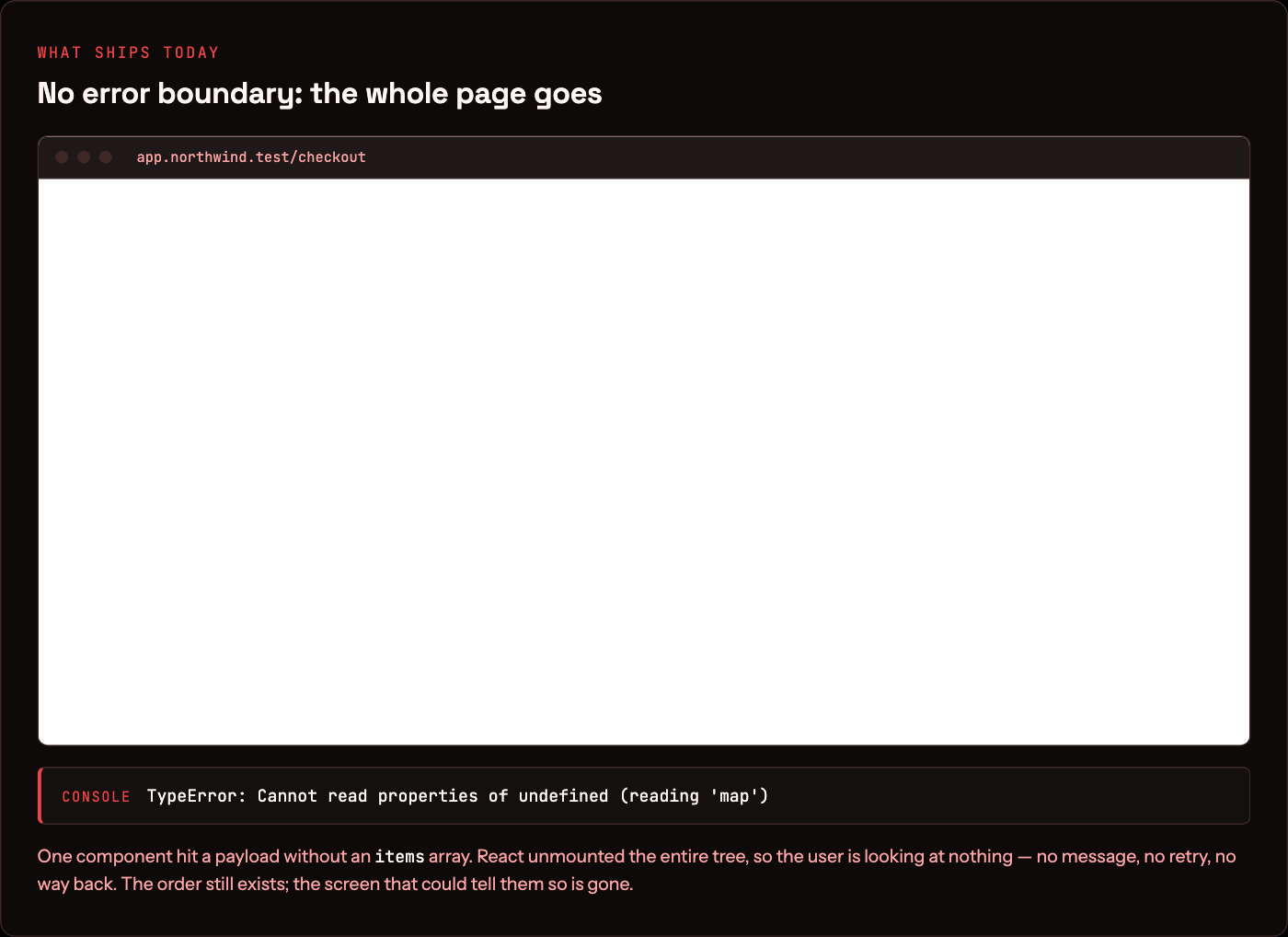
The happy path is the only path a vibe-coded app knows. Everything else is a raw throw — and in the browser, an unhandled throw is a white screen the user can't get out of.
Here is that failure, captured rather than described. Same app, same component, same bad payload — an API response that came back without the items array the render maps over. Without a boundary, React tears down the entire tree and the user is left staring at nothing:
Real error handling is the boring layer no demo ever shows: an error boundary so one failed component doesn't blank the whole page, a retry on the network call that flaked, a fallback state that says "this didn't load" instead of dying, and a log line so you hear about it before your users do. The same failure, with that layer in place, costs the user a card instead of the session:
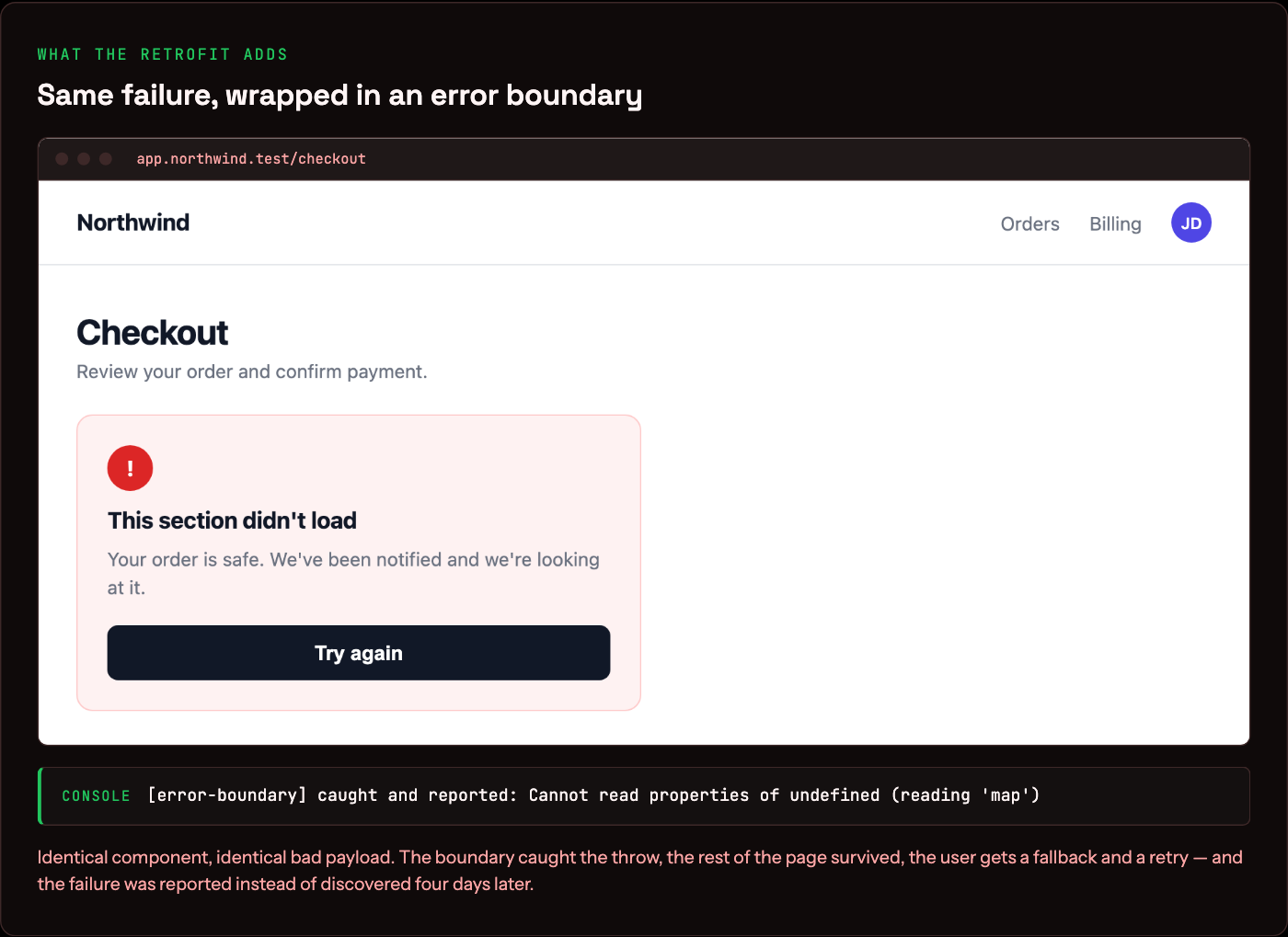
Wire up error monitoring alongside it — the free tier of Sentry covers a new app for months — and you turn "a user hit a wall four days ago and you never knew" into an alert you can act on the same hour.
What the cleanup actually costs
The question every founder asks next is the number. A vibe coding cleanup is a bounded piece of work, not a rewrite — retrofitting these three layers onto an app that already works keeps the surface layer intact. Here is the scope we quote for it, in hours, on a single-founder app with one core loop and payments live.
Forty hours against the 120 it would take to rebuild. That gap is the entire argument for the vibe-coded starting point: you keep the quarter that got built fast and you buy back the three-quarters that got skipped. The scope only holds if the surface is coherent — if the generated code has three competing state patterns and no data model, the audit says rebuild, and that is a different conversation.
What to do on day 30
None of this means the vibe-coded app was a mistake. It got you to a working product in a fraction of the time and cost — that's real, and it's the right way to find out whether anyone wants the thing. The mistake is treating the prototype as the finished build. When it starts carrying real users and real payments, three things go from optional to load-bearing:
- Put a test on every path that touches money or data. Not full coverage — just the paths where a silent break costs you a customer or a charge. Add the CI check that stops a red build.
- Replace generated auth with a real provider. Clerk or Supabase Auth, deny-by-default rules, rate limits on login. It's the cheapest insurance against the most expensive bug class you can ship.
- Handle the unhappy path. Error boundaries, retries, fallback states, and monitoring so you hear about failures before your users vote with their feet.
Vibe coding cleanup: common questions
What is a vibe coding cleanup specialist?
An engineer who takes an app built with AI coding tools and makes it safe to run on real users — replacing generated auth, adding tests on the paths that touch money and data, and putting real error handling and monitoring underneath the screens. It is a retrofit role, not a rewrite role: the surface the tool produced usually stays.
Is vibe-coded code secure?
The generated screens are rarely the risk. The auth is. Sessions that don't rotate, no rate limit on login, password resets that trust a cached token, and access rules that default to allow instead of deny are the failures we find repeatedly — and every one of them is invisible from the UI. Assume the auth needs replacing until an audit says otherwise.
How much does it cost to clean up a vibe-coded app?
Budget around 40 hours for a single-founder app with one core loop and payments live: roughly 14 hours of tests plus CI, 10 to replace generated auth, 10 for error handling and monitoring, and 6 for the audit that scopes it. That is against roughly 120 hours to rebuild the same product from scratch.
Should I clean it up or rebuild it?
Clean it up if the surface is coherent — one state pattern, a data model you can name, screens that match the product you actually want. Rebuild if the generated code has three competing state patterns, no data model, or a schema that can't express the next feature. The audit answers this in hours, and it is much cheaper to ask at day 30 than at day 300.
Can I keep using Lovable or Cursor afterwards?
Yes, and most founders should. The tools are genuinely fast at the surface layer. What changes after the retrofit is that generated code lands in a codebase with tests, a real auth provider, and CI that blocks a red build — so the next thing the tool writes gets checked before it reaches a user.
If you built v0 with an AI tool and you're about to put real users on it, that's the moment to have someone check the three layers you can't see. That's what a technical audit is — a senior read of the foundation before it has to hold weight. If the audit comes back saying the surface isn't worth keeping, that's a proper MVP build instead, and it's better to learn that at day 30 than day 300. Start from the stack we'd build this on, or send us the repo and we'll tell you what's missing →